|
|
Auto Shutdown Pro II
Saves you money, electricity, and your computer!
Overview
(30-Day Free Evaluation)
Auto Shutdown Pro reduces the electrical cost of running your
computer, while doubling or trippling the computer's life expectancy.
Auto Shutdown Pro (ASP2) is a computer management tool, a conservation product
which if applied aggressively will double or triple the life expectancy of any computer
while saving electricity. Given your computer costs between $500 to $1000, tripling
the life expectancy of your computer saves you $1000 to $2000 in capital expenditures
over a ten year period. The savings in operational costs, the electricity to run that
computer, can swell the savings from Auto Shutdown Pro to over $8000.
The operational costs of a computer is the electricity it uses.
Desktop computers use 300 to 600 watts. Laptop computers use 15 to 60 watts
but are far more prone to hardware failures. Monitors use 20 to 70 watts an
hour. A high-end gaming computer using 600 watts left running 24/7 will cost
you $1000 a year in electricity - which is like running 15 forty watt light bulbs
continuously.
|
|
Auto Shutdown Pro focuses on simply turning off your computer when its many features
sense that you are not using that computer. Thus, that $1000 a year in electrical
or operation expense for that high-end computer can be easily reduced to $667 a year. Auto Shutdown Pro can thus save a total
of $8670 on that high-end computer, $2000 in capital expenditures and $6670 in operating
or electrical costs over a ten year period of time. For a 300 watt low-end computer,
the savings is still $4300 over 10 years. The savings Auto Shutdown Pro will produce for you on any computer far exceed the initial purchase cost of a desktop, laptop, or
notebook computer.
Beyond money, Auto Shutdown Pro dramatically increases the security of your computer
far beyond passwords or virus protection. Auto Shutdown Pro has many features,
every one of which affect costs and security. As an illustration, consider the
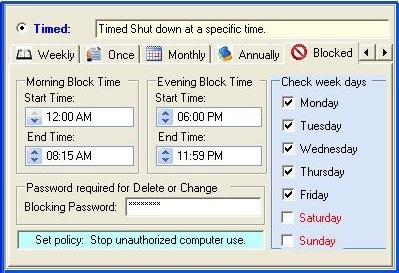
Blocked Timed feature of Auto Shutdown Pro .
Blocked Time:
Blocked Time is a feature that blocks use of the computer during the hours of the
day you specify. During times which are blocked out by you, your computer simply
will not run. If someone tries to subvert your wishes by powering on a computer protected by Auto Shutdown Pro's Blocked Time
|
|
|
feature, your computer will simply turn itself off within a minute once Windows starts even
if the thief has your computer's password.
Computers can be wonderful, as well as form of corruption. Auto Shutdown Pro II gives you
a clear solution with Blocked Time. Here are two illustrations of groups who will
benefit.
Illustration 1: Parents do not want their children playing
computer games, texting endlessly on Facebook, Twitter, or Yahoo Messenger, or chatting with unknown strangers on social media sites 24/7 especially through the night. In this corrupt evil society,
there are sexual predators, drug dealors. and gangs in every community who are looking all the time for that next unprotected child to abuse and even kill.
Many accomplish this evil daily through the Internet using social media.
|
|
|
This demonic criminal evil will travel any number of miles once they identify that next unprotected lonely child to trick and abuse. Children believe that they are indestructible, but parents know better. Today, they have to know. Parents have the most serious duty of all to protect their children from predators and from their children abusing themselves. Being a good parent means setting limits. And what parents really know for sure is that their children have to have their
sleep at night. Your kids can't learn in school and have a future if they have been up all night gaming. With Auto Shutdown Pro, parents can set absolute limits that
guarantee that their children will not be on that home computer after bedtime. Auto Shutdown Pro will keep those computers off even when parents are
asleep. With Auto Shutdown Pro parents get their children back safe, secure and protected which is what love and parenting is all about.
Illustration 2: All too easily computer passwords become common knowledge. Businessmen,
teachers, bank officers, supervisors, government officials and even the military
are justly concerned that confidential data can be stolen from their computers when
they are not at their desks in their offices. Corporate theft, spying, the loss
of intellectual data, breaches of security always begins as an inside job, many times
a paid breach of trust by unscrupulous employees selling out their own employers behind their own manager's backs. With Auto Shutdown Pro, those computers can not be breached
even if the thieves know the computer's password simply because Auto Shutdown Pro will not allow the computer to run during those off hours. Turn on the power
of a protected computer and Auto Shutdown Pro will simply turn the power off. With Auto Shutdown Pro your confidential data is absolutely secure. With Auto Shutdown Pro II on your business computer, you can sleep at night and not worry because your confidential corporate secrets are safe. No other shutdown software in the world has this Blocked Time feature. Without Auto Shutdown Pro II on your business computer, you are irresponsibly tempting your own employees to bankrupt and steal from your business, and sell your corporate secrets as their after-hour job to the competition. Auto Shutdown Pro II puts the crooks out of business. Be wise. Don't let people steal from you.
|
General Features:
The following table list the general tasks that Auto Shutdown Pro II will perform
on schedule:
|
|
##
|
Short Name
|
Description
|
|
01
|
Shutdown - Timed
|
Shutdown at a specific time: Â Daily, weekly, once only, monthly, annually, and
with blocked time.
|
|
02
|
Shutdown - Duration
|
Shutdown after so many hours use of the computer.
|
|
03
|
Shutdown - Idle
|
Shutdown if computer usage falls below a set percent over a time period you set. If the computer is not being used, turn it off.
|
|
04
|
Shutdown - Busy
|
If a computer virus gets pass the computer's virus protection and seizes 100% CPU
usage, the computer is shut down safely in 5 minutes or as you specify. Your computer is not
damaged: The hard drive's boot block is not destroyed. You don't
loose your computer. Your computer is protected by Auto Shutdown Pro II.
|
|
05
|
Shutdown - Heat
|
If the computer CPU overheats, Auto Shutdown Pro II turns off the computer before
the computer can be seriously damaged. If you don't use Auto Shutdown Pro II, and the
shutdown is not managed, the computer's registry can be corrupted. Once
again, your computer is protected.
|
|
06
|
Shutdown - Power
|
For laptops and notebooks: Â If battery power falls below a percent you set,
Auto Shutdown Pro II turns off the computer in an orderly manner. The computer's registry is
protected, and thus your computer is protected. |
|
07
|
Stand By/Sleep
|
Sleep the computer*.
|
|
08
|
Power On
|
Produces a timed re-awaking of a computer presently in a Sleep or Hibernation mode.
|
|
09
|
Restart
|
Restarts the computer*.
|
|
10
|
Logoff
|
Logs off the computer*.
|
|
11
|
Lock
|
Locks the computer*.
|
|
12
|
Hibernate
|
Hibernates the computer*.
|
|
13
|
Turn Off the Monitor
|
Turns off the computer's monitor*.
|
|
14
|
Action Schedule
|
Enables web hosted scheduling for corporate management of user groups.
Using the Action Schedule, a single network manager can set scheduling
for ten, a hundred, or thousands of computers that he may manages with a single
Auto Shutdown Pro II schedule hosted on his Internet or Intranet web site. |
|
15
|
Launch Program
|
Launch a program*.
|
|
16
|
Terminate Program
|
Terminate a specific program*.
|
|
17
|
Open a File
|
Open a file (such as a Word or Excel document) the computer*.
|
|
18
|
Open a URL
|
Open a web site URL on any installed  browser. Play mp3, wav, and flash at any time.
|
|
19
|
Show a Message
|
Display a custom message on the monitor*.
|
|
*This
option supports Timed or Duration, but not Blocked Time.
Availability:
Auto Shutdown Pro runs on Microsoft
Windows 10, Windows
8, Windows 7, Vista, and
XP. Auto Shutdown Pro II is a global program,
available in 66 different languages.
Price:
The price for Auto Shutdown Pro is $20. Auto Shutdown Pro II was written by a
retired American priest. The priest has set the price this low so that everyone can afford
Auto Shutdown Pro. The proceeds from Auto Shutdown Pro will be used to build
much needed orphanages in the Philippines. This priest and his programs are here to help you and to protect you. You really do need Auto Shutdown Pro II. Everybody does. Here's your opportunity: Be responsible. Save your computer, save a child, and
save the world. |
ownload Links
|
|
|